
Every
Match Moment

One simple matchday workflow

01 Record
02 Tag
03 Review
04 Share
One platform. Two matchday modes.

Use the camera when you want it.
Keep MatchCam when you don’t.

Choose the setup that suits each fixture. Record the full match, or run live updates without video—your tagger, scoreboard, match clock and sharing tools remain ready.

01 Camera mode

Record & Tag

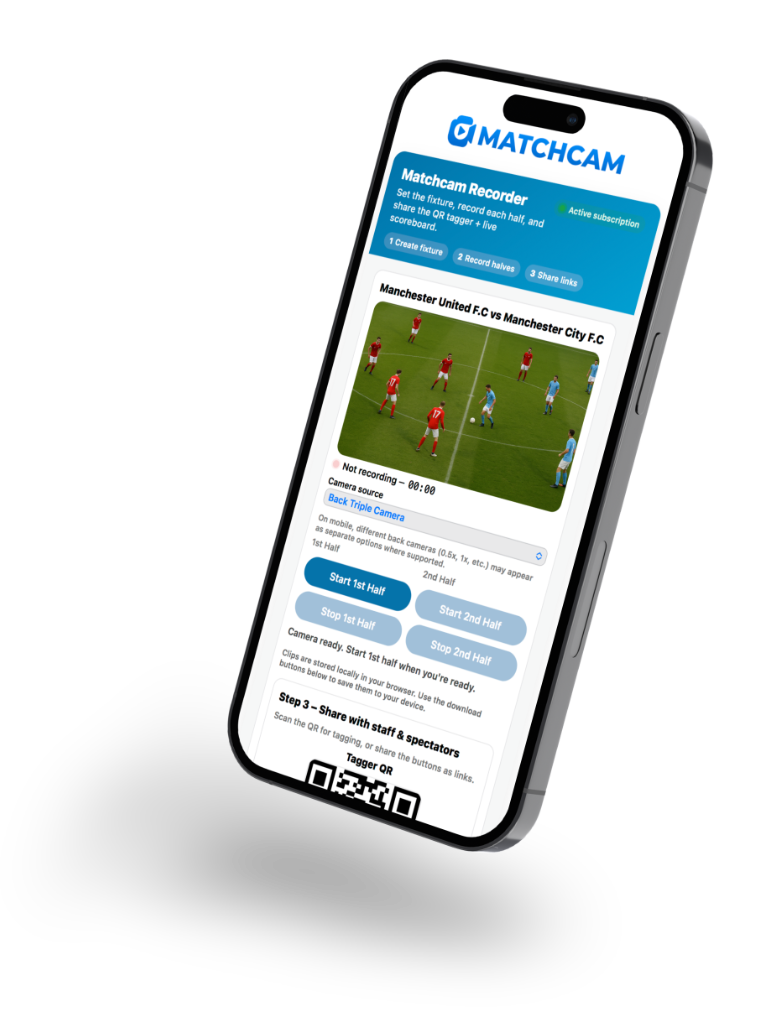
Capture each half through the browser while a second phone controls the match clock and tags key moments from the touchline.

  • ✓ Browser-based match recording
  • ✓ Remote phone tagger and half controls
  • ✓ Saved clips and match review
Best for Recording, review and development
02 No camera needed

Live Updates Only

Run the match from the tagger without recording video. Keep supporters updated and build the same match history as events happen.

  • ✓ Running match clock and live scoreboard
  • ✓ Goals, cards and multiple substitutions
  • ✓ Social graphics and direct publishing
Best for Fast, lightweight matchday coverage
Whichever mode you choose The match stays connected.
01Create fixture
02Run & tag
03Scoreboard
04Share & review
One connected matchday

One fixture.
Every screen connected.

Create the match once. MatchCam connects the recorder, phone tagger and live scoreboard so every key moment moves through the platform as it happens.

01 Control the matchStart and end each half from the touchline tagger.
02 Tag every momentGoals, cards and multiple substitutions at the correct match time.
03 Update instantlyThe scoreboard, statistics and sharing tools stay in sync.

Using Live Updates Only?The same tagger, clock, scoreboard and sharing flow—simply without the camera.

MatchCam ● CONNECTED
MATCHDAYHarbour Athletic vs Riverside FC
1st Half
Live camera preview The match footage appears here when the camera is armed.
RECORDING 18:42
CAMERABack camera · HD● Live
TAGGERTouchline phone● Connected
LIVE MATCH Harbour Athletic vs Riverside FC
MATCH CLOCK18:42
HALF CONTROL1st Half Live
Your teamOpposition
KEY MOMENTS
LIVE 18:42
HAHarbour 2 – 1 RFRiverside
LATEST UPDATE⚽ Goal · A. Taylor · 19′
Live scoreboardUpdated now
MatchCam Season 2026/27 ⌄
TEAM OVERVIEWYour season in numbers
Updated after every match
Matches12Played
Goals31For
Yellow7Cards
Red1Card
Player statisticsView all
PlayerAppsGoalsAssists
9 A. Taylor1084
7 J. Morgan1267
11 S. Reed953
Recent matchMatches →
FULL TIME · HOME
Harbour Athletic2 – 1Riverside FC
⚽ A. Taylor · 19′⚽ J. Morgan · 52′
ScoreboardMatch details
✓
MATCH SAVEDFixture history updatedScore, events and statistics are ready.
After the final whistle

What happens live becomes useful later.

MatchCam turns each tagged event into a clear match history. Results, goals, assists, cards and appearances build automatically as your season progresses.

Team and player statistics

See season totals and player contributions without rebuilding the numbers after every fixture.

Every fixture in one place

Return to previous scoreboards, key events and match details from a structured match library.

Review when you record

Recorded matches stay connected to their tagged moments, making important incidents easier to find and revisit.

Live Updates Only still builds the match result, event history and statistics—even when no video is recorded.

Live from the touchline

Turn a match moment into a club update.

When something happens, MatchCam prepares the update. You review the artwork and caption, choose where it should go and decide when to publish.

01

Tag the moment

Record a goal, card or substitution from the phone tagger.

02

Check before sharing

Preview the graphic, player details, match time and suggested caption.

03

Choose the destination

Publish to the connected Facebook Page, Instagram account or both.

You stay in control.Nothing is posted automatically. Publishing only begins after you select the accounts and press the final button.

MATCHDAY SHARING FLOW Feature overview
01
⚽
TAGGERTag a match event

Goal · card · substitution

02
PREVIEWReview artwork and caption

Club artwork or MatchCam’s generic team design

03
DESTINATIONSChoose where it goes

Facebook Page · Instagram · native sharing

f◎
04
✓
YOUR CONFIRMATIONPublish the selected update

MatchCam reports the result for each destination

Nothing posts automaticallyYou make the final decision
Simple team pricing

Everything your team needs.
One monthly plan.

No specialist camera system and no complicated package comparison. Start with the introductory rate and continue monthly only while MatchCam works for your team.

TEAM PLANIntroductory offer
£7.99/ month

For your first two billing periods

THEN
£9.99 per monthOngoing monthly subscription
Start with MatchCam →

Cancel before your next renewal · No minimum term

INCLUDEDThe complete team matchday platform
✓Record & TagBrowser recording with connected phone tagger
✓Live Updates OnlyRun the tagger and scoreboard without video
✓Live scoreboardRunning match clock and key-event updates
✓Matchday eventsGoals, cards and multiple substitutions
✓Social publishingReview and share selected match updates
✓Season statisticsTeam totals, player contributions and history
✓Squad managementMatchday line-ups, substitutes and team details
✓Saved match libraryFixtures, scoreboards and review links together
MORE THAN ONE TEAM?Multi-team and club accessTell us how your club is structured and we’ll discuss the right account setup.
Contact MatchCam

The £7.99 introductory rate applies to the first two monthly billing periods. The subscription then renews automatically at £9.99 per month until cancelled. Full details are shown before purchase and in the Terms of Service.

Responsible matchday technology

Built around clear control.

MatchCam gives teams practical tools to record, tag and share matches. The adults operating the account remain in control of what is entered, recorded and published.

01

Adult-managed accounts

MatchCam accounts are intended for adults authorised to operate the platform for their team, club or organisation.

02

Permission remains essential

Clubs and account holders must have the necessary authority and permissions before recording players or using their information and images.

03

Publishing is deliberate

Match updates are previewed first. Nothing is posted to connected social accounts until the user chooses the destinations and confirms publication.

04

Clear account controls

Connected social accounts can be disconnected, and users can request deletion of stored account and connection information.

HOW MATCHCAM HANDLES MATCHDAY CONTENT

Designed to keep decisions with the people running the team.

The platform separates recording, player artwork and social publishing into deliberate user actions rather than treating them as one automatic process.

Browser recordingsVideo clips stay on the recording device until the user downloads or removes them.
Player goal artworkUploaded player graphics are used for the relevant match update when the user chooses to share it.
Social connectionsFacebook and Instagram publishing can be disconnected from the MatchCam account controls.
Do I need a specialist camera?

No. MatchCam records through a supported web browser using the camera connected to your phone, tablet or compatible device. Device and browser capabilities can affect recording quality and reliability.

Can I use MatchCam without recording the match?

Yes. Choose Live Updates Only when creating the fixture. You can still use the match clock, phone Tagger, live scoreboard, statistics and social-sharing tools without opening the camera.

Where are my video recordings stored?

Browser recordings are stored locally on the recording device until you download or remove them. Important footage should be downloaded promptly, and browser data should not be cleared before the video has been saved elsewhere.

How does the phone Tagger connect?

Creating a fixture generates a Tagger link and QR code. Open it on the touchline phone to control the halves and record match events while the main device records—or use it on its own in Live Updates Only.

Can supporters follow the score live?

Yes. Each team match generates a live scoreboard link. The score, match state and tagged key events update as the Tagger is used.

Does MatchCam post automatically to social media?

No. MatchCam prepares a preview after a selected event. The user reviews the artwork and caption, chooses the connected destinations and confirms publication. Nothing is posted simply because an event was tagged.

Can MatchCam publish to Facebook and Instagram?

MatchCam can publish selected updates to a connected Facebook Page and its linked Instagram professional account once the required Meta connection has been completed. Native device sharing is also available.

Can MatchCam be used for children’s teams?

Accounts must be managed by authorised adults. The club or account holder is responsible for obtaining the necessary recording, safeguarding and image permissions before adding or sharing children’s information, footage or artwork.

What if I manage more than one team?

Multi-team and club account arrangements are available by enquiry. Contact MatchCam with the number of teams and how access needs to be managed.

How does the introductory price work?

The team plan is £7.99 per month for the first two billing periods. It then renews at £9.99 per month until cancelled. There is no minimum term; cancel before the next renewal to prevent the following payment.

Ready for matchday?

Your next match can be your first with MatchCam.

Record the action or run live updates without a camera. Either way, your Tagger, scoreboard, statistics and sharing tools are ready in one platform.

£7.99/month for the first two billing periods, then £9.99/month
01
READY
FIXTURE Match created

Teams, line-up and match settings prepared.

02
CONNECTED
MATCHDAY Tagger ready

Record & Tag or Live Updates Only.

03
LIVE
SUPPORTERS Scoreboard shared

Match clock, score and key events updating.

04
YOUR CHOICE
CLUB UPDATE Ready to publish

Review the selected update before sharing.

MATCHCAM CONNECTED